APITable-API Documents【Enterprise】
APITable-API Documents【Enterprise】
1. Explanation of terms
| Name | Description |
| Working directory | [Refers to] This is just an abstract concept and does not have any function. It represents a collection of all files and folders in the workspace. A logo displayed on the interface facilitates communication between people. The working directory is essentially a folder with parent_id = 0 |
| Node | [Refers to] If the "working directory" is compared to a towering tree, the "node" is the trunk branch on the tree. A file is a node, a folder is also a node For example: folders, tables, magic forms, mirroring, dashboards |
2. API interface list
| Module | Interface | address | description |
|---|---|---|---|
| Open Platform | datasheets , views, fields, records, space, working directories | APITable API Introduction | APITable Developer Center | APITable API Introduction | APITable Developer Center |
| Node management | Create node interface | /api/v1/node/create | Create magic forms, mirroring, dashboards, and more |
| Edit node interface | /api/v1/node/update/{nodeId} | Edit node name, icon, cover image | |
| Delete node interface | /api/v1/node/delete/{nodeId} | Delete node | |
| Copy node interface | /api/v1/node/copy | Copy a node | |
| Mobile node interface | /api/v1/node/move | Copy a node to the specified folder | |
| Recovery node interface | /api/v1/node/rubbish/recover | Restore a node from Recycle Bin | |
| Query node details interface | /api/v1/node/showcase?nodeId={nodeId} | Query node details | |
| data import | Excel import interface | /api/v1/node/import | Excel data import and automatically generate a wigtable |
| Template management | Save to specified space station interface | api/v1/node/storeShareData | Use this template and save to the specified space station. The "shareId" is obtained by turning on "Public Sharing" and "Save as Copy" |
| Use template interface | /api/v1/node/storeShareData | Use the template and save to the specified space station | |
| Update node sharing configuration interface | /api/v1/node/updateShare/{nodeId} | For tables, folders, mirroring and other nodes, you can enable "Public Sharing" and set "Save as Copy", "Read Only" or "Editable" | |
| Developer token management | Create Developer Token Interface | /api/v1/user/createApiKey | Create a developer token, a user can only create one token |
| Query user information/Developer Token interface | /api/v1/user/me | Query user information and return developer Token | |
| Refresh the developer Token interface | /api/v1/user/refreshApiKey | Replace a new Developer Token | |
| Embedded API | Embedded interface | Create Embedded Links | APITable Developer Center | Create Embedded Links | APITable Developer Center |
| Permission & related interface | Permission callback interface | /callback/permission/verify | Currently supports four roles: manageable, editable, read-only, and updatable. The embedding party refers to the requirements interface below to provide the corresponding permission interface, and the embedding party performs permission control on the node. After enabling this function, the node permission in APITable will be controlled by a third party. |
| 3.8 Associated data table pop-up window - datasheet list | APITable-API Documents【Enterprise】 | 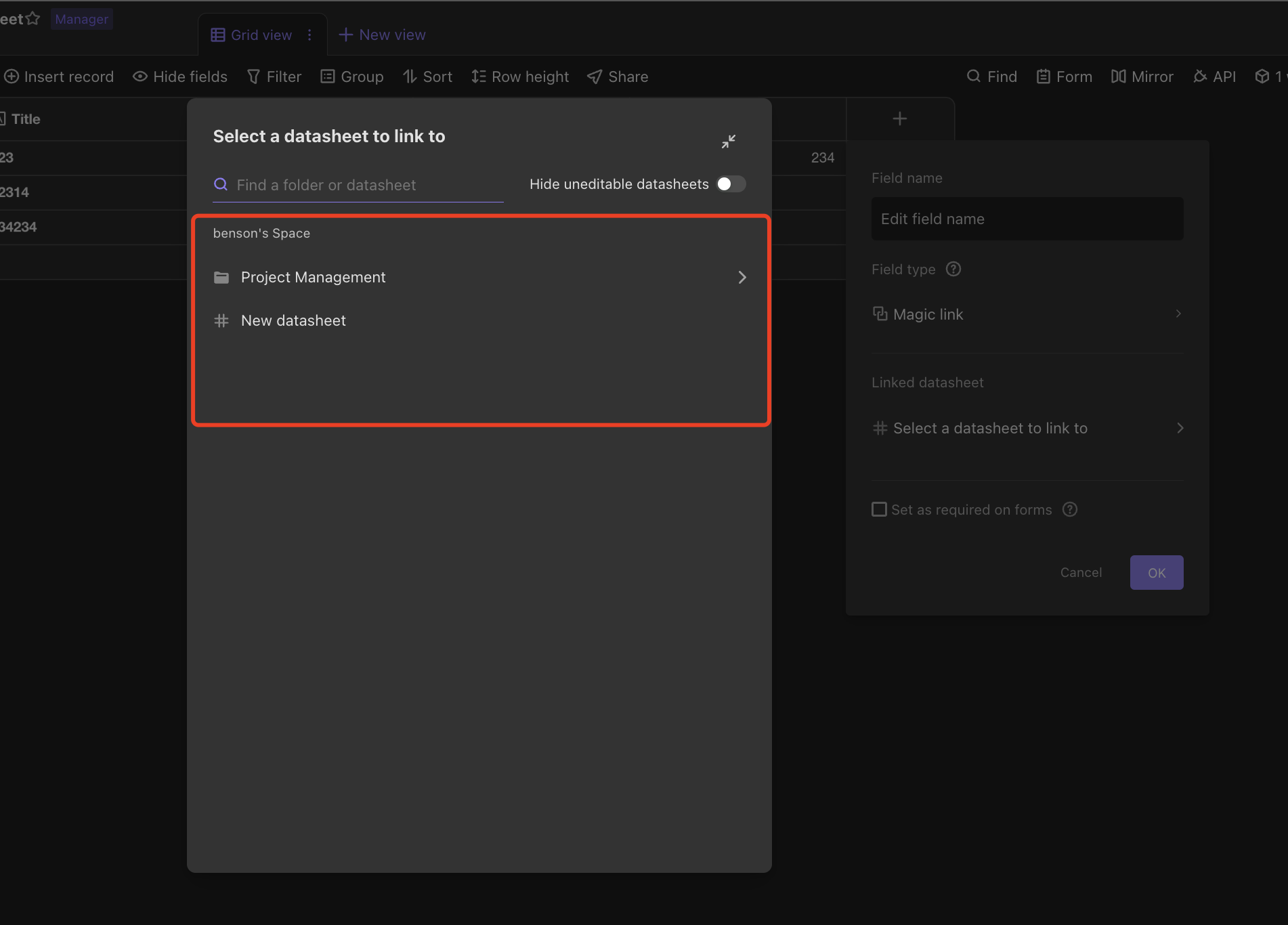 | |
| Form management interface | Generate form sharing link interface | /api/v1/node/updateShare/{formId} | Generate a public sharing link for the form, submit form data anonymously by default |
| Query forms and associated information interfaces | /nest/v1/form/{formId}/dataPack | According to the form ID, query the form information and the corresponding associated table and view information. | |
| Update the form sharing interface | /nest/v1/form/{formId}/prop | Generate a public sharing link for the form, submit form data anonymously by default | |
| View management | Create a view interface | /fusion/v1/datasheets/{datasheetId}/views | Create a new |
| Delete specify single view interface | /fusion/v1/datasheets/{datasheetId}/views/{viewId} | Drops a single view of a specified table | |
| Batch deletes multiple view interfaces | /fusion/v1/datasheets/{datasheetId}/views | Batch drops multiple views of a specified table | |
| Edit view interface | /fusion/v1/datasheets/{datasheetId}/views/{viewId} | Support editing view name, support view lock switch | |
| Copy view interface | /fusion/v1/datasheets/{datasheetId}/views/{viewId}/duplicate | Support view copying, automatically generate new views | |
| Space management | For details, please view: 3.12 Space management interface | ||
| User management | For details, please view: 3.13 User management interface | ||
| Team management | For details, please view: 3.14 Team management interface | ||
| Notification management | For details, please view: 3.15 Notification management interface |
3. Access Guide
3.1 API interface call certificate
3.1.1 What is an API Token?
API Token is the user authentication token.When sending API requests to APITAble servers, you must take Authorization: Bearer {Your API Token} at the head of the request to facilitate server authentication.
When authenticated successfully, the API request will have the same permissions as the user has to operate on the APITAble interface, that is, what data the user can do on the interface, and what data can be used in the request.
3.1.2 How to get API Token?
The way to get API Token is as follows:
Sign in to APITable and tap the profile of the lower left corner, enter the User Center and go to the Developer Configuration.
Click "+" to generate an API Token.Note: You need to bind your email when you generate it for the first time.
Copy API Token.
Attention:
- Please secure your API Token, if API Token leaks, others may tamper with data in your datasheet.
- If the API Token is leaked, you can regenerate the Token in the Developer Configuration screen to ensure data security.
3.1.3 How to use API Token?
Example HTTPS request in some common languages using the Access API interface:
Note: Before executing the following code, you need to replace the {datasheetid} and {your API Token} to the real datasheetId and API token.
curl "https://api.apitable.com/fusion/v1/datasheets/{datasheetId}/records" \
-H "Content-Type: application/json" \
-H "Authorization: Bearer {Your API Token}"
3.2 Node management
3.2.1 Creating a Node Interface
Interface address /api/v1/node/create
Request method POST
Interface request Content-Type application/json
Interface description
Create a new node under the node
Request parameters
| Parameter name | Parameter description | necessary? | Data type |
|---|---|---|---|
| nodeName | Name | No | String |
| type | Type. 1: Folder; 2: Table; 3: Magic Form; 4: Dashboard; 5: mirroring | Yes | String |
| preNodeId | The previous node of the target position is moved to the first place when it is empty | Yes | String |
| parentId | Parent Node Id | No | String |
| extra | First create the table and get the table and view ID, then enter the associated table, view ID, and specify the default generated view name For example: form and mirroring need to pass these two parameters when creating according to a table and view. | No | Json |
| checkDuplicateName | Verify whether a node name with the same name already exists in the same directory, and refuse to create it if it exists | No | boolean |
Sample request parameters
{
  "extra": {
    "datasheetId": "dstxP8YTtNuKcKgLtM",
    "viewId": "viwtGNVtasHNK",
    "viewName": "New view name"
},
  "checkDuplicateName": true,
  "nodeName": "New node name",
  "parentId": "fodYhcLHqURTs",
  "type": 3
}
Response Result Parameters
| Parameter name | Parameter description | Data type |
|---|---|---|
| columnLimit | When the node is a table, return whether the table field has reached the upper limit. | boolean |
| hasChildren | Is there a sub-node, the node type is folder | boolean |
| icon | Node icon | string |
| nodeFavorite | Whether the node is a star | boolean |
| nodeId | Node ID | string |
| nodeName | Node name | string |
| nodePermitSet | Whether node permissions are set | boolean |
| nodeShared | Whether the node is shared | boolean |
| parentId | Parent node Id | string |
| preNodeId | Previous Node ID | string |
| role | Role | string |
| spaceId | Space ID | string |
| type | integer(int32) | |
| createTime | Creation time | object |
| updateTime | Update time | object |
Return result example
{
        "code": 200,
        "data": {
               "columnLimit": true,
               "createTime": "2020-03-18T15:29:59.000",
               "hasChildren": true,
               "icon": ":smile",
               "nodeFavorite": false,
               "nodeId": "nod10",
               "nodeName": "New node name",
               "nodePermitSet": false,
               "nodeShared": false,
               "parentId": "nod10",
               "preNodeId": "nod11",
               "role": "editor",
               "spaceId": "spc09",
               "type": 1,
               "updateTime": "2020-03-18T15:29:59.000"
        },
        "message": "SUCCESS",
        "success": true
}
3.2.2 Edit node interface
Interface address /api/v1/node/update/{nodeId}
Request method POST
Interface request Content-Type application/json
Interface description
Node ID is required, name and icon are not required
Request parameters
| Parameter name | Parameter description | necessary? | Data type |
| nodeName | Node name | No | String |
| cover | Cover image, empty ('null' OR'undefined '), example values (space/2020/5/19/..) | Yes | String |
| showRecordHistory | Whether to display the recorded history, example value (1), after setting: only look at the cell content, hide the history and comment area on the right | No | integer(int32) |
| icon | Emoji icon, example value (: smile) | No | String |
Sample request parameters
{
  "cover": "space/2020/5/19/..",
  "icon": ":smile",
  "nodeName": "New node name",
  "showRecordHistory": 1
}
Response Result Parameters
| Parameter name | Parameter description | Data type |
|---|---|---|
| code | Result response code, 200 means success | integer(32) |
| message | Response result description | String |
| success | Whether successful | boolean |
Return result example
{
  "success": true,
  "code": 200,
  "message": "SUCCESS",
  "data": null
}
3.2.3 Delete the node interface
Interface address /api/v1/node/delete/{nodeId}
Request method DELETE
Content-Type application/x-www-form-urlencoded
Interface description
Parameters must be passed
Request parameters
| Parameter name | Parameter description | necessary? | Data type |
|---|---|---|---|
| nodeId | Node ID | No | String |
Response Result Parameters
| Parameter name | Parameter description | Data type |
| code | Result response code, 200 means success | integer(32) |
| message | Response result description | String |
| success | Whether successful | boolean |
Return result example
{
  "success": true,
  "code": 200,
  "message": "SUCCESS",
  "data": null
}
3.2.4 Copy node interface
Interface address /api/v1/node/copy
Request method POST
Interface request Content-Type application/json
Interface description
The node ID is required, and the parameter of "Do you need to copy data" is not required.
Request parameters
| Parameter name | Parameter description | necessary? | Data type |
|---|---|---|---|
| data | Do you need to copy data | No | String |
| nodeId | Node Id | Yes | boolean |
Sample request parameters
{
  "data": true,
  "nodeId": "nod10"
}
Response Result Parameters
| Parameter name | Parameter description | Data type |
|---|---|---|
| columnLimit | When the node is a table, return whether the table field has reached the upper limit. | boolean |
| hasChildren | Is there a sub-node, the node type is folder | boolean |
| icon | Node icon | string |
| nodeFavorite | Whether the node is a star | boolean |
| nodeId | Node ID | string |
| nodeName | Node name | string |
| nodePermitSet | Whether node permissions are set | boolean |
| nodeShared | Whether the node is shared | boolean |
| parentId | Parent node Id | string |
| preNodeId | Previous Node ID | string |
| role | Role | string |
| spaceId | Space ID | string |
| type | integer(int32) | |
| createTime | Creation time | object |
| updateTime | Update time | object |
Return result example
{
        "code": 0,
        "data": {
                "columnLimit": true,
                "createTime": "2020-03-18T15:29:59.000",
                "hasChildren": true,
                "icon": ":smile",
                "nodeFavorite": false,
                "nodeId": "nod10",
                "nodeName": "It's a node",
                "nodePermitSet": false,
                "nodeShared": false,
                "parentId": "nod10",
                "preNodeId": "nod11",
                "role": "editor",
                "spaceId": "spc09",
                "type": 1,
                "updateTime": "2020-03-18T15:29:59.000"
        },
        "message": "",
        "success": true
}
3.2.5 Move node interface
Interface address /api/v1/node/move
Request method POST
Interface request Content-Type application/json
Interface description
Node ID, Parent Node ID is Required
Request parameters
| Parameter name | Parameter description | Request type | necessary? | Data type |
|---|---|---|---|---|
| X-Space-Id | Space station ID | header | Yes | string |
| nodeId | Node Id | body | Yes | string |
| parentId | Move to the specified destination folder ID | body | Yes | string |
| preNodeId | The previous node ID of the destination folder | body | No | string |
Sample request parameters
{
  "nodeId": "nod10",
  "parentId": "nod10",
  "preNodeId": "nod10"
}
Response Result Parameters
| Parameter name | Parameter description | Data type |
|---|---|---|
| columnLimit | When the node is a table, return whether the table field has reached the upper limit. | boolean |
| hasChildren | Is there a sub-node, the node type is folder | boolean |
| icon | Node icon | string |
| nodeFavorite | Whether the node is a star | boolean |
| nodeId | Node ID | string |
| nodeName | Node name | string |
| nodePermitSet | Whether node permissions are set | boolean |
| nodeShared | Whether the node is shared | boolean |
| parentId | Parent node Id | string |
| preNodeId | Previous Node ID | string |
| role | Role | string |
| spaceId | Space ID | string |
| type | integer(int32) | |
| createTime | Creation time | object |
| updateTime | Update time | object |
Return result example
{
        "code": 0,
        "data": {
                "columnLimit": true,
                "createTime": "2020-03-18T15:29:59.000",
                "hasChildren": true,
                "icon": ":smile",
                "nodeFavorite": false,
                "nodeId": "nod10",
                "nodeName": "New node name",
                "nodePermitSet": false,
                "nodeShared": false,
                "parentId": "nod10",
                "preNodeId": "nod11",
                "role": "editor",
                "spaceId": "spc09",
                "type": 1,
                "updateTime": "2020-03-18T15:29:59.000"
        },
        "message": "",
        "success": true
}
3.2.6 Restore Node Interface
Interface address /api/v1/node/rubbish/recover
Request method POST
Interface request Content-Type application/json
Interface description
Node ID must be passed
Request parameters
| Parameter name | Parameter description | Request type | necessary? | Data type |
|---|---|---|---|---|
| X-Space-Id | Space station ID | header | Yes | string |
| nodeId | Node Id | body | Yes | string |
| parentId | Restore to the specified destination folder ID | body | No | string |
Sample request parameters
{
  "nodeId": "nod10",
  "parentId": "nod10"
}
Response Result Parameters
| Parameter name | Parameter description | Data type |
|---|---|---|
| columnLimit | When the node is a table, return whether the table field has reached the upper limit. | boolean |
| hasChildren | Is there a sub-node, the node type is folder | boolean |
| icon | Node icon | string |
| nodeFavorite | Whether the node is a star | boolean |
| nodeId | Node ID | string |
| nodeName | Node name | string |
| nodePermitSet | Whether node permissions are set | boolean |
| nodeShared | Whether the node is shared | boolean |
| parentId | Parent node Id | string |
| preNodeId | Previous Node ID | string |
| role | Role | string |
| spaceId | Space ID | string |
| type | integer(int32) | |
| createTime | Creation time | object |
| updateTime | Update time | object |
Return result example
{
        "code": 0,
        "data": {
                "columnLimit": true,
                "createTime": "2020-03-18T15:29:59.000",
                "hasChildren": true,
                "icon": ":smile",
                "nodeFavorite": false,
                "nodeId": "nod10",
                "nodeName": "New node name",
                "nodePermitSet": false,
                "nodeShared": false,
                "parentId": "nod10",
                "preNodeId": "nod11",
                "role": "editor",
                "spaceId": "spc09",
                "type": 1,
                "updateTime": "2020-03-18T15:29:59.000"
        },
        "message": "",
        "success": true
}
3.2.6 Query node details interface
Interface address /api/v1/node/showcase? nodeId = {nodeId}
Request method GET
Interface request Content-Type application/json
Interface description
It needs to be called after the user login, and the node ID must be passed.
Request parameters
| Parameter name | Parameter description | Request type | necessary? | Data type |
|---|---|---|---|---|
| nodeId | Node Id | body | Yes | string |
Response Result Parameters
| 参数名称 | 参数说明 | 类型 |
|---|---|---|
| cover | Cover image, the privatized version can splice the URL by itself, for example: https://{domain name}/vk-assets-ltd/{cover} | string |
| createdMemberInfo | Node Creator Information | Data Creator View |
| avatar | Node Creator Avatar | string |
| memberName | Node creator nickname | string |
| description | Node description | string |
| icon | Node icon | string |
| nodeFavorite | Whether to collect Node | boolean |
| nodeId | Node id | string |
| nodeName | Node name | string |
| role | permission role | string |
| type | Node type 0-ROOT (root node) 1-folder (folder) 2-file (table) | integer(int32) |
| updatedAt | node updatetime | string(date-time) |
Return result example
{
        "code": 0,
        "data": {
                "cover": "space/2021/04/26/27a006f669094af2913513abe5a8cb5d",
                "createdMemberInfo": {
                        "avatar": "https://s1.apitable.com/2019/11/12/17123187253.png",
                        "memberName": ""
                },
                "description": "This is a showcase",
                "icon": "smile",
                "nodeFavorite": false,
                "nodeId": "nod10",
                "nodeName": "This is a node",
                "role": "editor",
                "type": 1,
                "updatedAt": ""
        },
        "message": "",
        "success": true
}
3.3 Data import
3.3.1 Excel data import interface
Interface address /api/v1/node/import
Request method POST
Interface request Content-Type multipart/form-data
Interface description
- Import FAQ can be viewed: Import and Export Data | APITable Help Center
- Parameter required, prohibit uploading .html type files
- The size limit for excel and CSV file uploads is 20M by default.
- The following file formats are supported:
- Excel (.xlsx files, .xls files)
- CSV
- Reasons for file import failure may include the following:
- File password exists Problem description: When the local file has "open permission password", it cannot be imported successfully. Solution: Cancel the password of the file locally, and then re-import it into the wig table .
- File size exceeds the upper limit Problem description: If the file exceeds 20 MB, the number of rows exceeds 50,000, and the number of columns exceeds 50, the import will fail. Solution: Split the file into two copies for import. If you want to increase the function limit of this space station, you can follow our subscription plan.
- File corruption problem description: When the Enterprise Archive File does not match the format, it cannot be imported successfully. Solution: Check whether the file can be opened normally locally. If it can be opened normally, save the file as .xlsx, .xls or CSV format before uploading to the wig table .
- Network instability solution: When the network is poor or disconnected, it cannot be successfully imported. Description of the problem: Close the file upload window and upload again.
Request parameters
| Parameter name | Parameter description | Whether it is necessary to | Data type |
|---|---|---|---|
| file | Upload files | Yes | file |
| parentId | Parent node Id | Yes | string |
| viewName | Custom generated default view name | No | string |
Sample request parameters
How to submit the form
file: binary file
parentId: "fodxxxxx"
viewName: "xxxx"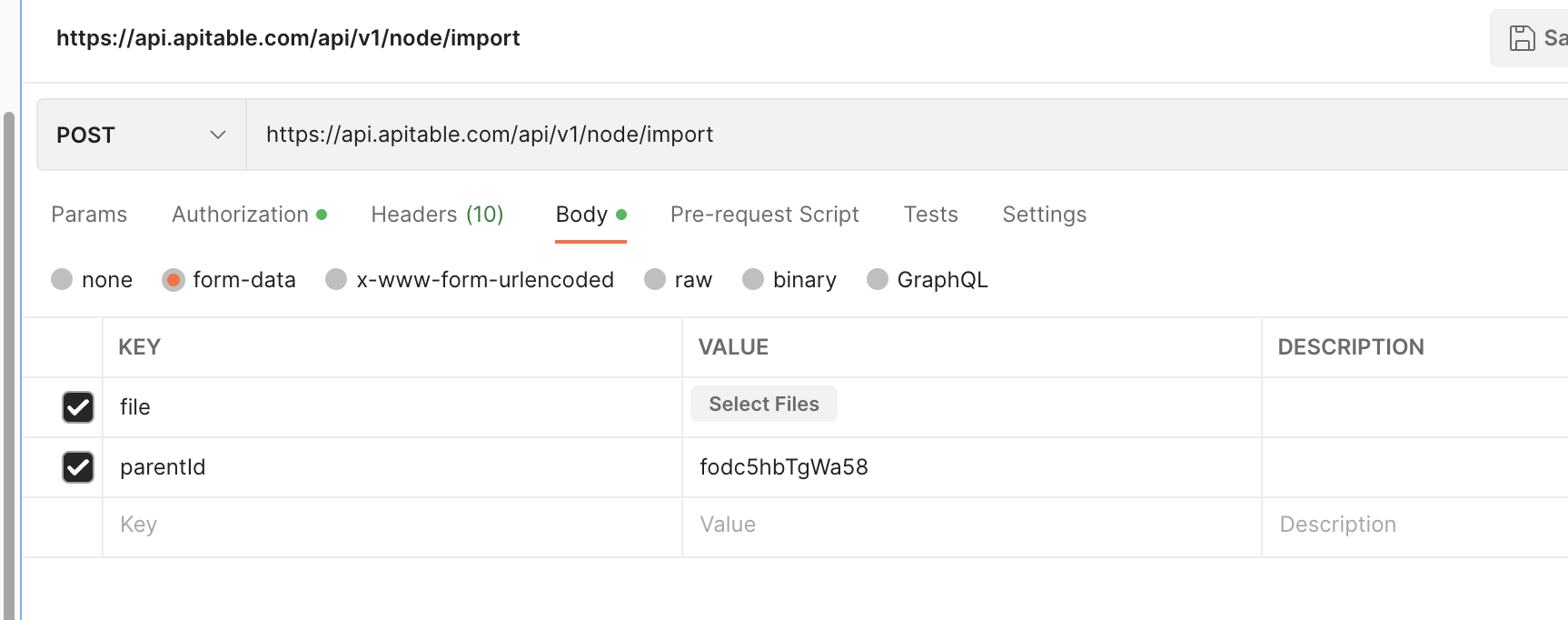
Response Result Parameters
| Parameter name | Parameter description | Data type |
|---|---|---|
| columnLimit | When the node is a table, return whether the table field has reached the upper limit. | boolean |
| hasChildren | Is there a sub-node, the node type is folder | boolean |
| icon | Node icon | string |
| nodeFavorite | Whether the node is a star | boolean |
| nodeId | Node ID | string |
| nodeName | Node name | string |
| nodePermitSet | Whether node permissions are set | boolean |
| nodeShared | Whether the node is shared | boolean |
| parentId | Parent node Id | string |
| preNodeId | Previous Node ID | string |
| role | Role | string |
| spaceId | Space ID | string |
| type | integer(int32) | |
| createTime | Creation time | object |
| updateTime | Update time | object |
Return result example
{
  "success": true,
  "code": 200,
  "message": "SUCCESS",
  "data": {
    "nodeId": "dstXl6JRZqPu44vFpz",
    "nodeName": "Nodename 2",
    "type": 2,
    "spaceId": "spce4cVuY8HSK",
    "parentId": "fodwtvCSAWJRi",
    "preNodeId": null,
    "icon": "",
    "hasChildren": false,
    "nodeShared": false,
    "nodePermitSet": false,
    "nodeFavorite": false,
    "columnLimit": false,
    "createTime": "2023-03-01T07:44:11.000Z",
    "updateTime": "2023-03-01T07:44:11.000Z",
    "role": "manager"
  }
}
Abnormal BigInt
FILE_ERROR_FORMAT(240, "file format error"),

FILE_EXCEED_LIMIT(240, "a single upload file should not exceed 20 mb"),

ROW_EXCEED_LIMIT(240, "The number of lines exceeds the limit of 50000 lines"),

COLUMN_EXCEED_LIMIT(240, "the number of columns exceeds the 200 limit"),
3.4 Template management
3.4.1 Save to the specified space station interface
Interface address api/v1/node/storeShareData
Request method POST
Interface request Content-Type application/json
Interface description
Use this template and save to the specified space station, "shareId" is obtained after turning on "public sharing" and "can be saved as a copy", refer to 3.4.2 to enable public sharing and save as a copy interface
Request parameters
| Parameter name | Parameter description | necessary? | Data type |
| shareId | The unique ID shared by the node, which is equivalent to the template ID | Yes | string |
| spaceId | Space Id | Yes | string |
Sample request parameters
{
  "shareId": "shrSJ921CNsj",
  "spaceId": "spc20cjiwis2"
}
Return result example
{
        "code": 0,
        "data": {
                "nodeId": "nod2818jsak"
        },
        "message": "",
        "success": true
}
3.4.2 Update the node sharing configuration interface
Interface address /api/v1/node/updateShare/{nodeId}
Request method POST
Interface request Content-Type application/json
Interface description
For tables, folders, mirroring and other nodes, you can enable "Public Sharing" and set "Save as Copy", "Read Only" or "Editable"
Sample request parameters
{
    "props": "{\"canBeStored\":true}"
}
Return result example
{
        "code": 0,
        "data": {
                "shareId": "shrKsX1map5RfYO"
        },
        "message": "",
        "success": true
}
3.4.3 Using the template interface
Interface address /api/v1/template/quote
Request method POST
Interface request Content-Type application/json
Interface description
On the space station template, save the template to the specified directory of the current space station.
Request parameters
| Parameter name | Parameter description | Request type | necessary? | Data type |
|---|---|---|---|---|
| templateId | template ID | body | TRUE | string |
| parentId | Use the template and save to the specified folder ID | body | TRUE | string |
| data | Whether to bring template data, if set to false, the template will not bring its own data | body |
Sample request parameters
{
  "templateId": "tplbtANZ8glG8",
  "parentId": "foduWeEymZaWZ",
  "data": true
}
Response Result Parameters
| Parameter name | Parameter description | Data type |
| columnLimit | When the node is a table, return whether the table field has reached the upper limit. | boolean |
| hasChildren | Is there a sub-node, the node type is folder | boolean |
| icon | Node icon | string |
| nodeFavorite | Whether the node is a star | boolean |
| nodeId | Node ID | string |
| nodeName | Node name | string |
| nodePermitSet | Whether node permissions are set | boolean |
| nodeShared | Whether the node is shared | boolean |
| parentId | Parent node Id | string |
| preNodeId | Previous Node ID | string |
| role | Role | string |
| spaceId | Space ID | string |
| type | integer(int32) | |
| createTime | Creation time | object |
| updateTime | Update time | object |
Return result example
{
  "nodeId": "fodqPw5KnNmXH",
  "nodeName": "Nodename 2",
  "type": 1,
  "spaceId": "spcHTNGSlQ7o7",
  "parentId": "foduWeEymZaWZ",
  "preNodeId": null,
  "icon": "innocent",
  "hasChildren": true,
  "nodeShared": false,
  "nodePermitSet": false,
  "nodeFavorite": false,
  "columnLimit": false,
  "createTime": "2023-01-06T11:01:46.000Z",
  "updateTime": "2023-01-06T11:01:46.000Z",
  "role": "manager"
}
3.5 Developer Token Management
3.5.1 Create Developer Token Interface
Interface address /api/v1/user/createApiKey
Request method POST
Interface request Content-Type application/json
Interface description
Create a developer token, a user can only create one token
Request parameters
No
Response Result Parameters
| Parameter name | Parameter description | Data type |
|---|---|---|
| code | Result response code, 200 means success | integer(32) |
| message | Response result description | String |
| success | Whether successful | boolean |
Return result example
{
  "success": true,
  "code": 200,
  "message": "SUCCESS",
  "data": null
}
3.5.2 Query User Information/Developer Token Interface
Interface address /api/v1/user/me
Request method GET
Content-Type application/x-www-form-urlencoded
Interface description
Query user information and return developer Token
Response Result Parameters
Return result example
{
        "code": 0,
        "data": {
                "activeNodeId": "dst151d",
                "activeViewId": "views135",
                "apiKey": "uskPtGBUw8EuVKoo3X6",
                "areaCode": "+1",
                "avatar": "null",
                "closeAt": "",
                "email": "test@apitable.com",
                "isAdmin": false,
                "isDelSpace": false,
                "isMainAdmin": false,
                "isPaused": false,
                "lastLoginTime": "",
                "memberId": 101,
                "memberName": "Member 1",
                "mobile": "\"123123123\"",
                "needPwd": false,
                "nickName": "Jone",
                "signUpTime": "",
                "spaceDomain": "",
                "spaceId": "spcx2yLGGedWc",
                "spaceLogo": "http://...",
                "spaceName": "My Workspace",
                "unitId": 101,
                "userId": "1",
                "uuid": "1261273764218",
        },
        "message": "",
        "success": true
}
3.5.3 Refresh the developer Token interface
Interface address /api/v1/user/refreshApiKey
Request method POST
Interface request Content-Type application/json
Interface description
Create a new node under the node
Request parameters
Sample request parameters
{
  "code": "125484",
  "type": "sms_code"
}
Return result example
{
        "code": 0,
        "data": {
                "apiKey": "xxxxxxx"
        },
        "message": "",
        "success": true
}
3.6 Embedded API interface
Create Embedded Links | APITable Developer Center
3.7 Permission callback interface
Currently supports four roles: manageable, editable, read-only, and updatable.
The embedding party refers to the requirements interface below to provide the corresponding permission interface, and the embedding party performs permission control on the node.
After enabling this function, the node permission in APITable will be controlled by a third party.
The authentication part of the interface can be provided below
Interface address /callback/permission/verify
Request method POST
Interface request Content-Type application/json
Parameter list
Authentication parameters are as follows
Sign instance code
Map<String, Object> paramMap = new HashMap<>();
paramMap.put("nodeId", "dsadsa");
paramMap.put("uid", "332ddd");
paramMap.put("appKey", "1233");
paramMap.put("timestamp", System.currentTimeMillis()/1000);
paramMap.put("salt", "asdsff");
String sign = sign(paramMap, "skey");

/**
 * Signture
 * @param paramMap
 * @param sk secrect
 * @return sign
 */
public static String sign(Map<String, Object> paramMap, String sk) {
    Map<String, Object> params = new TreeMap<>(paramMap);

    String query = HttpUtil.toParams(params, "utf-8");
    String md5 = SecureUtil.md5(query);
    String data = md5 + sk;
    String sha256 = SecureUtil.sha256(data);
    return sha256;
}
Return example
{
  "returnCode": 200,
  "returnMessage": "success",
  "result": {
      "permission": 1 // -1:deleted,0:no permission, 1:reador,2:editor 3 updator,4:manager
    }
}
3.8 Associated data table pop-up window - datasheet list
Refer to the following interface imported parameter exported parameter, the embedding party provides the API interface, the environment variables need to be configured, after opening, the interface will be automatically called back
Environment variables:
ONEACCESS_ENABLED: true
ONEACCESS_IAM_HOST: https://wecom.com/wiki/ku/datasheet
INFOFLOW_PERMISSIONS_ENABLED: 'true'
Request parameters: request body
Shared with the prefix of the permission callback address, please refer to 3.8 Permission callback interface
Response parameters
{
        "success": true,
        "code": 200,
        "message": "SUCCESS",
        "data": [{
                "nodeId": "fodRmaMkkxhmN",
        }, {
                "nodeId": "fodqsgXRcByur",
        }]
}
3.10 Form management interface
3.10.1 Generate form sharing link interface
Interface address /api/v1/node/updateShare/{formId}
Request method POST
Interface request Content-Type application/json
Interface description
Generate a public sharing link for the form, submit form data anonymously by default
Request parameters
| Parameter name | Parameter description | Request type | necessary? | Data type |
|---|---|---|---|---|
| props | ||||
| canBeEdited | Set public sharing to submit | TRUE | string |
Sample request parameters
{
  "props": "{\"canBeEdited\":true}"
}
Response Result Parameters
| Parameter name | Parameter description | Data type |
| code | Result response code, 200 means success | integer(32) |
| message | Response result description | String |
| success | Whether successful | boolean |
| shareId | The public share link ID of the node, a unique value | String |
Return result example
{
    "success": true,
    "code": 200,
    "message": "SUCCESS",
    "data": {
        "shareId": "shreeDeXU8hPKrBc0QVy1"
    }
}
3.10.2 Query forms and associated information interfaces
Interface address /nest/v1/form/{formId}/dataPack
Request method GET
Interface request Content-Type application/json
Interface description
According to the form ID, query the form information and the corresponding associated table and view information.
Request parameters
{
    "success": true,
    "code": 200,
    "message": "SUCCESS",
    "data": {
        "shareId": "shreeDeXU8hPKrBc0QVy1"
    }
}
Response Result Parameters
| Parameter name | Parameter description | Data type |
|---|---|---|
| code | Result response code, 200 means success | integer(32) |
| message | Response result description | String |
| success | Whether successful | boolean |
Return result example
{
    "success": true,
    "code": 200,
    "message": "SUCCESS",
    "data": {
        "sourceInfo": {
            "datasheetIcon": "custard",
            "datasheetRevision": 958,
            "datasheetId": "dstFBd7zsBE525B0yl",
            "viewId": "viwXiwVG3TEig",
            "datasheetName": "Task Management",
            "datasheetPermissions": {
                "nodeId": "dstFBd7zsBE525B0yl",
                "datasheetId": "dstFBd7zsBE525B0yl",
                "manageable": true,
                "editable": true,
                "readable": true,
                "childCreatable": true,
                "renamable": true,
                "iconEditable": true,
                "descriptionEditable": true,
                "movable": true,
                "copyable": true,
                "importable": true,
                "exportable": true,
                "removable": true,
                "sharable": true,
                "allowSaveConfigurable": true,
                "allowEditConfigurable": true,
                "templateCreatable": true,
                "viewCreatable": true,
                "viewRenamable": true,
                "viewRemovable": true,
                "viewMovable": true,
                "viewExportable": true,
                "viewFilterable": true,
                "columnSortable": true,
                "columnHideable": true,
                "fieldSortable": true,
                "fieldGroupable": true,
                "rowHighEditable": true,
                "columnWidthEditable": true,
                "columnCountEditable": true,
                "rowSortable": true,
                "fieldCreatable": true,
                "fieldRenamable": true,
                "fieldPropertyEditable": true,
                "fieldRemovable": true,
                "rowCreatable": true,
                "rowRemovable": true,
                "cellEditable": true,
                "fieldPermissionManageable": true,
                "viewLayoutEditable": true,
                "viewStyleEditable": true,
                "viewKeyFieldEditable": true,
                "viewColorOptionEditable": true,
                "viewLockManageable": true,
                "viewManualSaveManageable": true,
                "viewOptionSaveEditable": true,
                "isDeleted": false
            }
        }
    }
}
3.10.3 Update the form sharing interface
Interface address /nest/v1/form/{formId}/prop
Request method POST
Interface request Content-Type application/json
Interface description
Generate a public sharing link for the form, submit form data anonymously by default
Request parameters
| Parameter name | Parameter description | necessary? | Data type |
|---|---|---|---|
| title | input form's title name | FALSE | string |
| submitLimit | After the login and submission are enabled, whether to limit the submission once is enabled, and 0 means that unlimited submissions are allowed | FALSE | string |
| fillAnonymous | Whether to enable anonymous submission, set to false to submit after login | FALSE |
Sample request parameters
{
  "title": "test form",
  "submitLimit": 0,
  "fillAnonymous": true
}
Response Result Parameters
| Parameter name | Parameter description | Data type |
|---|---|---|
| code | Result response code, 200 means success | integer(32) |
| message | Response result description | String |
| success | Whether successful | boolean |
| shareId | The public share link ID of the node, a unique value | String |
Return result example
{
  "success": true,
  "code": 200,
  "message": "SUCCESS"
}
3.11 View management interface
3.11.1 Create a view interface
Interface address /fusion/v1/datasheets/{datasheetId}/views
Request method POST
Interface request Content-Type application/json
Interface description
Create a new and different view from a table
Request parameters
| Parameter name | Parameter description | Request type | necessary? | Data type |
|---|---|---|---|---|
| datasheetId | datahseet ID | path | TRUE | string |
| name | view name | body | TRUE | string |
| autoSave | whether to support automatic saving | body | FALSE | boolean |
| type | view type, Grid-table, Gallery-album, Kanban-kanban, Gantt-Gantt chart, Calendar-calendar, Architecture-architecture view | body | TRUE | string |
| columns | hide Field Information | body | FALSE | array |
| fieldId | field ID | body | FALSE | string |
| sortInfo | Field ordering information | body | FALSE | string |
| keepSort | whether to enable automatic sorting | body | FALSE | string |
| rules | field collation | body | FALSE | string |
| desc | true,means descending sort | body | FALSE | string |
| fieldId | field ID | body | FALSE | string |
| groupInfo | Field grouping information | body | FALSE | string |
| desc | true,means descending sort | body | FALSE | string |
| fieldId | field ID | body | FALSE | string |
| filterInfo | field filter information | body | FALSE | string |
| conditions | filter condition | body | FALSE | string |
| fieldId | field ID | body | FALSE | string |
| operator | filter condition,[ is, isNot, contains, doesNotContain, isEmpty, isNotEmpty, isGreater, isGreaterEqual, isLess, isLessEqual, isRepeat ] | body | FALSE | string |
| value | filter value | body | FALSE | string |
| conjunction | Used when multiple conditions, ex: and, or | body | FALSE | string= |
Sample request parameters
{
  "name": "New niewname",
  "autoSave": true,
  "type": "Grid",
  "columns": [
    {
      "fieldId": "string"
    }
  ],
  "sortInfo": {
    "keepSort": true,
    "rules": [
      {
        "desc": true,
        "fieldId": "string"
      }
    ]
  },
  "groupInfo": [
    {
      "desc": true,
      "fieldId": "string"
    }
  ],
  "filterInfo": {
    "conditions": [
      {
        "fieldId": "string",
        "operator": "is",
        "value": "['string', true]"
      }
    ],
    "conjunction": "and"
  }
}
Response Result Parameters
| Parameter name | Parameter description | Data type |
|---|---|---|
| code | Result response code, 200 means success | integer(32) |
| message | Response result description | String |
| success | Whether successful | boolean |
| views | View information | String |
| id | View ID | String |
| type | View type | String |
| name | View name | String |
Return result example
{
    "code": 200,
    "success": true,
    "data": {
        "views": [
            {
                "id": "viw62ysqDDUUy",
                "type": "Grid",
                "name": "apitable"
            }
        ]
    },
    "message": "SUCCESS"
}
3.11.2 Delete a view interface
Interface address /fusion/v1/datasheets/{datasheetId}/views/{viewId}
Request method DELETE
Interface request Content-Type application/json
Interface description
Delete a view
Request parameters
| Parameter name | Parameter description | Request type | necessary? | Data type |
|---|---|---|---|---|
| datasheetId | datasheet ID | path | TRUE | string |
| viewId | view ID | path | TRUE | string |
Response Result Parameters
| Parameter name | Parameter description | Data type |
|---|---|---|
| code | Result response code, 200 means success | integer(32) |
| message | Response result description | String |
| success | Whether successful | boolean |
Return result example
{
  "success": true,
  "code": 200,
  "message": "SUCCESS"
}
3.11.3 Edit View Interface
Interface address /fusion/v1/datasheets/{datasheetId}/views/{viewId}
Request method PUT
Interface request Content-Type application/json
Interface description
Support editing view name, support view lock switch
Request parameters
| Parameter name | Parameter description | Request type | necessary? | Data type |
|---|---|---|---|---|
| datasheetId | datasheet ID | path | TRUE | string |
| viewId | view ID | path | TRUE | string |
| name | view name | FALSE | string | |
| lockInfo | Control video lock on, set to null if you want to turn off video lock | FALSE | object | |
| description | Describe the reason for enabling the view lock | FALSE | string | |
| autoSave | Whether to support automatic saving | FALSE | boolean |
Sample request parameters
{
  "name": "Rename view",
  "lockInfo": {
    "description": "Write something reason..."
  },
  "autoSave": true
}
Response Result Parameters
| Parameter name | Parameter description | Data type |
|---|---|---|
| code | Result response code, 200 means success | integer(32) |
| message | Response result description | String |
| success | Whether successful | boolean |
| views | View information | String |
| id | View ID | String |
| type | View type | String |
| name | View name | String |
Return result example
{
    "code": 200,
    "success": true,
    "data": {
        "views": [
            {
                "id": "viw62ysqDDUUy",
                "type": "Grid",
                "name": "benson"
            }
        ]
    },
    "message": "SUCCESS"
}
3.11.4 Copy View Interface
Interface address /fusion/v1/datasheets/{datasheetId}/views/{viewId}/duplicate
Request method POST
Interface request Content-Type application/json
Interface description
Support view copying, automatically generate new views
Request parameters
| Parameter name | Parameter description | Request type | necessary? | Data type |
|---|---|---|---|---|
| datasheetId | datasheet ID | path | TRUE | string |
| viewId | view ID | path | TRUE | string |
Response Result Parameters
| Parameter name | Parameter description | Data type |
|---|---|---|
| code | Result response code, 200 means success | integer(32) |
| message | Response result description | String |
| success | Whether successful | boolean |
| views | View information | String |
| id | View ID | String |
| type | View type | String |
| name | View name | String |
Return result example
{
    "code": 200,
    "success": true,
    "data": {
        "views": [
            {
                "id": "viwWkZqJDMXeR",
                "type": "Grid",
                "name": "benson1111"
            }
        ]
    },
    "message": "SUCCESS"
}
Sample request parameters
[
  {
    "toUserId": [],
    "toMemberId": [],
    "toUnitId": [],
    "fromUserId": "1261273764218",
    "nodeId": "nod10",
    "spaceId": "spcHKrd0liUcl",
    "templateId": "user_filed",
    "body": {
      "config": {
        "order": true,
        "ignoreError": true,
        "ignoreCase": true,
        "dateFormat": "",
        "ignoreNullValue": true,
        "transientSupport": true,
        "ignoreTransient": true
      },
      "empty": true
    },
    "version": "v0.12.1.release",
    "expireAt": "1614587900000",
    "notifyId": "1614587900000"
  }
]
Response Result Parameters
| Parameter name | Parameter description | Data type |
|---|---|---|
| code | Result response code, 200 means success | integer(32) |
| message | Response result description | String |
| success | Whether successful | boolean |
| views | View information | String |
| id | View ID | String |
| type | View type | String |
| name | View name | String |
| name | description | type |
|---|---|---|
| success | boolean | |
| code | integer(int32) | |
| message | string | |
| data | object |
3.12 Space management interface
3.12.1 Create Sapce
Interface address /api/v1/space/create
Request method POST
Interface request Content-Type application/json
Interface description
Create a new and different view from a table
Request parameters
| name | description | type | require | type | schema |
|---|---|---|---|---|---|
| name | Name | TRUE | string |
Sample request parameters
{
  "name": "This is a space"
}
Response Params
| name | description | type | schema |
|---|---|---|---|
| success | boolean | ||
| code | integer(int32) | integer(int32) | |
| message | string | ||
| data | CreateSpaceResultVo | CreateSpaceResultVo | |
| spaceId | Space ID | string |
Response Example
 {
        "success": true,
        "code": 0,
        "message": "",
        "data": {
               "spaceId": "spc10"
        }
}
3.12.2 Get Space info
Interface address /api/v1/space/info/{spaceId}
Request method GET
Interface request Content-Type application/x-www-form-urlencoded
Interface description
Create a new and different view from a table
Request parameters
| name | description | type | require | type |
|---|---|---|---|---|
| spaceId | space id | path | TRUE | string |
Response Params
| name | description | type | schema |
|---|---|---|---|
| success | boolean | ||
| code | integer(int32) | integer(int32) | |
| message | string | ||
| data | SpaceInfoVO | SpaceInfoVO | |
| spaceName | Space name | string | |
| spaceLogo | Space logo | string | |
| creatorName | Creator name | string | |
| isCreatorNameModified | Whether the member (creator) has modified the nickname | boolean | |
| creatorAvatar | Creator's avatar | string | |
| ownerName | Space owner name | string | |
| isOwnerNameModified | Whether the member (owner) has modified the nickname | boolean | |
| ownerAvatar | Space owner's avatar | string | |
| createTime | Creation timestamp (ms) | string(date-time) | |
| delTime | Formal deletion timestamp (ms) | string(date-time) | |
| social | Third party integrated binding information of the space | SpaceSocialConfig | SpaceSocialConfig |
| enabled | Whether the third party platform binding is enabled for the space | boolean | |
| platform | Third party platform type(1: WeCom, 2: DingTalk, 3: Lark) | integer | |
| appId | App ID | string | |
| appType | Application Type(1: Enterprise self built application, 2: Independent service provider) | integer | |
| authMode | Authorization mode. 1: Enterprise authorization; 2: Member Authorization | integer | |
| contactSyncing | Whether the address book is being synchronized | boolean | |
| deptNumber | Number of departments | integer(int64) | |
| seats | Number of seats | integer(int64) | |
| sheetNums | Number of tables | integer(int64) | |
| recordNums | Total rows of all tables in the space | integer(int64) | |
| adminNums | Number of space administrators | integer(int64) | |
| capacityUsedSizes | Used attachment capacity (in bytes) | integer(int64) | |
| apiRequestCountUsage | Cumulative usage of API calls | integer(int64) | |
| fieldRoleNums | Total number of field permission settings | integer(int64) | |
| nodeRoleNums | Total number of file permission settings | integer(int64) | |
| kanbanViewNums | Total Kanban Views | integer(int64) | |
| galleryViewNums | Total Album Views | integer(int64) | |
| ganttViewNums | Total Gantt Views | integer(int64) | |
| calendarViewNums | Total Calendar Views | integer(int64) | |
| formViewNums | Total Form Views | integer(int64) | |
| currentBundleCapacityUsedSizes | Used current package attachment capacity (unit: bytes) | integer(int64) | |
| giftCapacityUsedSizes | Used complimentary accessory capacity (unit: bytes) | integer(int64) | |
| mirrorNums | Number of tables (mirrors) | integer(int64) |
Response Example
{
        "success": true,
        "code": 0,
        "message": "",
        "data": {
               "spaceName": "My Workspace",
               "spaceLogo": "http://...",
               "creatorName": "Jack",
               "isCreatorNameModified": true,
               "creatorAvatar": "http://...",
               "ownerName": "Li Si",
               "isOwnerNameModified": true,
               "ownerAvatar": "http://...",
               "createTime": "",
               "delTime": "",
               "social": {
                       "enabled": false,
                       "platform": 1,
                       "appId": "1",
                       "appType": 1,
                       "authMode": 1,
                       "contactSyncing": false
               },
               "deptNumber": 5,
               "seats": 5,
               "sheetNums": 5,
               "recordNums": 5,
               "adminNums": 5,
               "capacityUsedSizes": 1024,
               "apiRequestCountUsage": 10,
               "fieldRoleNums": 10,
               "nodeRoleNums": 10,
               "kanbanViewNums": 10,
               "galleryViewNums": 10,
               "ganttViewNums": 10,
               "calendarViewNums": 10,
               "formViewNums": 10,
               "currentBundleCapacityUsedSizes": 1024,
               "giftCapacityUsedSizes": 1024,
               "mirrorNums": 5
        }
}
3.13.3 Update Space
Interface address /api/v1/space/update
Request method POST
Interface request Content-Type application/json
Interface description
At least one item is the name and logo
Request parameters
| name | description | type | require | type |
|---|---|---|---|---|
| X-Space-Id | space id | header | TRUE | string |
| name | Name | FALSE | string | |
| logo | Icon | FALSE | string |
Sample request parameters
{
  "name": "This is a new space name",
  "logo": "https://..."
}
Response Params
| name | description | type | schema |
|---|---|---|---|
| success | boolean | ||
| code | integer(int32) | integer(int32) | |
| message | string | ||
| data | object |
Response Example
 {
        "success": true,
        "code": 0,
        "message": "",
        "data": null
}
3.14.4 Delete Space
Interface address /api/v1/space/cancel/{spaceId}
Request method POST
Interface request Content-Type application/x-www-form-urlencoded
Request parameters
| name | description | require | type |
|---|---|---|---|
| spaceId | space id | TRUE | string |
Response Params
| name | type |
|---|---|
| success | boolean |
| code | integer(int32) |
| message | string |
| data | object |
Response Example
{
        "success": true,
        "code": 0,
        "message": "",
        "data": {}
}
3.13 User management interface
3.13.1 Create user
Interface address /api/v1/register
Request method POST
Interface request Content-Type application/json
Request parameters
| name | description | require | type |
|---|---|---|---|
| username | Username(email/telephone...) | TRUE | string |
| credential | Credential(password/verify code...) | TRUE | string |
Sample request parameters
{
  "username": "xxxx@apitable.com",
  "credential": "qwer1234 || 261527"
}
Response Params
| name | description | type | schema |
|---|---|---|---|
| success | boolean | ||
| code | integer(int32) | integer(int32) | |
| message | string | ||
| data | CreateSpaceResultVo | CreateSpaceResultVo |
Response Example
 {
        "success": true,
        "code": 0,
        "message": "",
        "data": null
}
3.13.2 Get User info
Interface address /api/v1/user/me
Request method GET
Interface request Content-Type application/x-www-form-urlencoded
Request parameters
| name | description | type | require | type |
|---|---|---|---|---|
| spaceId | space id | query | FALSE | string |
| nodeId | node id | query | FALSE | string |
| filter | whether to filter space related information | query | FALSE | boolean |
Response Params
| name | description | type | schema |
|---|---|---|---|
| success | boolean | ||
| code | integer(int32) | integer(int32) | |
| message | string | ||
| data | UserInfoVo | UserInfoVo | |
| userId | User ID (the actual return is uuid) | string | |
| uuid | User UUID | string | |
| nickName | Nickname | string | |
| areaCode | Mobile phone area code | string | |
| mobile | Phone number | string | |
| string | |||
| avatar | Avatar | string | |
| signUpTime | Registration time | string(date-time) | |
| lastLoginTime | Last logon time | string(date-time) | |
| thirdPartyInformation | Account association vo | array | UserLinkVo |
| type | Association Type:0DingTalk;1WeChat | integer | |
| nickName | Account nickname | string | |
| createTime | Binding time | string | |
| needPwd | Whether to set a password is required. It indicates that the user does not have a password. It is a standard field for initialization and password setting | boolean | |
| needCreate | Whether it is necessary to create a space indicates that the user does not have any space association, which is a standard field for space creation guidance | boolean | |
| spaceId | Space id | string | |
| spaceName | Space name | string | |
| spaceLogo | Space logo | string | |
| memberId | Member ID corresponding to the space | integer(int64) | |
| memberName | Member name corresponding to the space | string | |
| unitId | Organization unit ID of the corresponding member of the space | integer(int64) | |
| activeNodeId | ID of the open data table node in the space | string | |
| activeViewId | ID of the view opened in the meter | string | |
| activeNodePos | Active node location (0: working directory; 1: star) | integer(int32) | |
| isAdmin | Whether it is a space administrator, and whether the space management menu is displayed | boolean | |
| isMainAdmin | Primary administrator or not | boolean | |
| isPaused | Whether the account is cancelled during the cooling off period (account recovery is allowed during the cooling off period) | boolean | |
| closeAt | Account destruction time | string(date-time) | |
| isDelSpace | Whether the space is deleted | boolean | |
| apiKey | Developer Access Token | string | |
| wizards | JSONObject | JSONObject | |
| config | JSONConfig | JSONConfig | |
| order | boolean | ||
| ignoreError | boolean | ||
| ignoreCase | boolean | ||
| dateFormat | string | ||
| ignoreNullValue | boolean | ||
| transientSupport | boolean | ||
| ignoreTransient | boolean | ||
| empty | boolean | ||
| inviteCode | Personal invitation code | string | |
| spaceDomain | Space station domain name | string | |
| isNameModified | Whether the user's space has changed the internal nickname (abandoned) | boolean | |
| isNewComer | Whether the user is new | boolean | |
| isNickNameModified | (Used in WeCom)Whether the user has modified the nickname | boolean | |
| isMemberNameModified | (Used in WeCom)Whether the member has modified the nickname | boolean | |
| sendSubscriptionNotify | Whether to send subscription related notifications | boolean | |
| usedInviteReward | Have you ever used invitation rewards | boolean | |
| avatarColor | default avatar color number | integer(int32) | |
| timeZone | user time zone | string |
Response Example
{
        "success": true,
        "code": 0,
        "message": "",
        "data": {
               "userId": "1",
               "uuid": "1261273764218",
               "nickName": "Jack",
               "areaCode": "+1",
               "mobile": "\"88888888\"",
               "email": "admin@apitable.com",
               "avatar": "null",
               "signUpTime": "",
               "lastLoginTime": "",
               "thirdPartyInformation": [
                       {
                               "type": 1,
                               "nickName": "A short song line",
                               "createTime": ""
                       }
               ],
               "needPwd": false,
               "needCreate": false,
               "spaceId": "spcx2yLGGedWc",
               "spaceName": "My Workspace",
               "spaceLogo": "http://...",
               "memberId": 0,
               "memberName": "",
               "unitId": 0,
               "activeNodeId": "dst151d",
               "activeViewId": "views135",
               "activeNodePos": 0,
               "isAdmin": false,
               "isMainAdmin": false,
               "isPaused": false,
               "closeAt": "",
               "isDelSpace": false,
               "apiKey": "uskPtGBUw8EuVKoo3X6",
               "wizards": {
                       "config": {
                               "order": true,
                               "ignoreError": true,
                               "ignoreCase": true,
                               "dateFormat": "",
                               "ignoreNullValue": true,
                               "transientSupport": true,
                               "ignoreTransient": true
                       },
                       "empty": true
               },
               "inviteCode": "test",
               "spaceDomain": "",
               "isNameModified": true,
               "isNewComer": true,
               "isNickNameModified": true,
               "isMemberNameModified": true,
               "sendSubscriptionNotify": true,
               "usedInviteReward": true,
               "avatarColor": 0,
               "timeZone": "UTC-5(America/Toronto)"
        }
}
3.13.3 Update User info
Interface address /api/v1/user/update
Request method POST
Interface request Content-Type application/json
Interface description
At least one item is the name and logo
Request parameters
| name | description | require | type |
|---|---|---|---|
| maxSize | FALSE | integer(int32) | |
| avatar | Avatar | FALSE | string |
| avatarColor | default avatar color | FALSE | integer(int32) |
| nickName | Nickname | FALSE | string |
| init | Whether it is a registered initialization nickname | FALSE | boolean |
| locale | Language | FALSE | string |
| timeZone | Time Zone | FALSE | string |
Sample request parameters
{
  "maxSize": 0,
  "avatar": "https://...",
  "avatarColor": 1,
  "nickName": "This is a nickname",
  "init": true,
  "locale": "zh-CN",
  "timeZone": "America/Toronto"
}
Response Params
| name | description | type | schema |
|---|---|---|---|
| success | boolean | ||
| code | integer(int32) | integer(int32) | |
| message | string | ||
| data | string |
Response Example
 {
        "success": true,
        "code": 0,
        "message": "",
        "data": null
}
3.13.4 Delete User
Interface address/api/v1/user/applyForClosing
Request method POST
Interface request Content-Type application/x-www-form-urlencoded
Request parameters
| name | description | require | type |
|---|---|---|---|
| spaceId | space id | TRUE | string |
Response Params
| name | type |
|---|---|
| success | boolean |
| code | integer(int32) |
| message | string |
| data | object |
Response Example
 {
        "success": true,
        "code": 0,
        "message": "",
        "data": null
}
3.14 Team management interface
3.13.1 Create team
Interface address /api/v1/org/team/create
Request method POST
Interface request Content-Type application/json
Request parameters
| name | description | type | require | type |
|---|---|---|---|---|
| X-Space-Id | space id | header | TRUE | string |
| name | Department name | TRUE | string | |
| superId | Parent ID, 0 if the parent is root | TRUE | integer(int64) |
Sample request parameters
{
  "name": "Finance Department",
  "superId": 0
}
Response Params
| name | description | type | schema |
|---|---|---|---|
| success | boolean | ||
| code | integer(int32) | integer(int32) | |
| message | string | ||
| data | CreateSpaceResultVo | CreateSpaceResultVo |
Response Example
 {
        "success": true,
        "code": 0,
        "message": "",
        "data": null
}
3.13.2 Get Team info
Interface address /api/v1/org/team/read
Request method GET
Interface request Content-Type application/x-www-form-urlencoded
Request parameters
| name | description | type | require | type |
|---|---|---|---|---|
| X-Space-Id | space id | header | TRUE | string |
| teamId | team id | query | FALSE | string |
Response Params
| name | description | type | schema |
|---|---|---|---|
| success | boolean | ||
| code | integer(int32) | integer(int32) | |
| message | string | ||
| data | TeamInfoVo | TeamInfoVo | |
| teamId | Department ID | integer(int64) | |
| teamName | Department name | string | |
| memberCount | Number of department members | integer(int32) |
Response Example
{
        "success": true,
        "code": 0,
        "message": "",
        "data": {
               "teamId": 1,
               "teamName": "R&D Department",
               "memberCount": 3
        }
}
3.13.3 Update Team info
Interface address /api/v1/org/team/update
Request method POST
Interface request Content-Type application/json
Interface description
Update team info. If modify team level, default sort in the end of parent team
Request parameters
| name | description | type | require | type |
|---|---|---|---|---|
| X-Space-Id | space id | header | TRUE | string |
| teamId | Department ID | TRUE | integer(int64) | |
| teamName | Department name | FALSE | string | |
| superId | Parent ID, 0 if the parent is root | TRUE | integer(int64) |
Sample request parameters
{
  "teamId": 1,
  "teamName": "Design Department",
  "superId": 0
}
Response Params
| name | description | type | schema |
|---|---|---|---|
| success | boolean | ||
| code | integer(int32) | integer(int32) | |
| message | string | ||
| data | string |
Response Example
 {
        "success": true,
        "code": 0,
        "message": "",
        "data": null
}
3.13.4 Delete Team
Interface address/api/v1/org/team/delete/{teamId}
Request method POST
Interface request Content-Type application/x-www-form-urlencoded
Request parameters
| name | description | type | require | type |
|---|---|---|---|---|
| teamId | team id | path | TRUE | string |
| X-Space-Id | space id | header | TRUE | string |
Response Params
| name | description | type | schema |
|---|---|---|---|
| success | boolean | ||
| code | integer(int32) | integer(int32) | |
| message | string | ||
| data | object |
Response Example
 {
        "success": true,
        "code": 0,
        "message": "",
        "data": null
}
3.15 Notification management interface
3.15.1 Create a notification interface
Interface address /api/v1/player/notification/create
Request method POST
Interface request Content-Type application/json
Interface description
About the notification templates, pls view this file [Notification.json]
Request parameters
| name | description | require | type | schema |
|---|---|---|---|---|
| toUserId | ID of the notified user (optional) | FALSE | array | string |
| toMemberId | Either the member ID or to User Id of the notified user (optional) | FALSE | array | string |
| toUnitId | Either the organizational unit ID or to User ID of the notified user (optional) | FALSE | array | string |
| fromUserId | Send the notification user ID, and the system notifies the user as 0 (optional) | FALSE | string | |
| nodeId | Node ID (optional) | FALSE | string | |
| spaceId | Space ID (optional) | FALSE | string | |
| templateId | Template ID | TRUE | string | |
| body | FALSE | JSONObject | JSONObject | |
| config | FALSE | JSONConfig | JSONConfig | |
| order | FALSE | boolean | ||
| ignoreError | FALSE | boolean | ||
| ignoreCase | FALSE | boolean | ||
| dateFormat | FALSE | string | ||
| ignoreNullValue | FALSE | boolean | ||
| transientSupport | FALSE | boolean | ||
| ignoreTransient | FALSE | boolean | ||
| empty | FALSE | boolean | ||
| version | Version number (optional) | FALSE | string | |
| expireAt | Expiration time (optional) accurate to milliseconds | FALSE | string | |
| notifyId | Notification ID (optional) | FALSE | string |
Sample request parameters
[
  {
    "toUserId": [],
    "toMemberId": [],
    "toUnitId": [],
    "fromUserId": "1261273764218",
    "nodeId": "nod10",
    "spaceId": "spcHKrd0liUcl",
    "templateId": "add_sub_admin",
    "body": {
      "config": {
        "order": true,
        "ignoreError": true,
        "ignoreCase": true,
        "dateFormat": "",
        "ignoreNullValue": true,
        "transientSupport": true,
        "ignoreTransient": true
      },
      "empty": true
    },
    "version": "v0.12.1.release",
    "expireAt": "1614587900000",
    "notifyId": "1614587900000"
  }
]
Response Result Parameters
| Parameter name | Parameter description | Data type |
|---|---|---|
| code | Result response code, 200 means success | integer(32) |
| message | Response result description | String |
| success | Whether successful | boolean |
| views | View information | String |
| id | View ID | String |
| type | View type | String |
| name | View name | String |
Response Example
 {
        "success": true,
        "code": 0,
        "message": "",
        "data": null
}
3.15.2 Get notification list
Interface address /api/v1/player/notification/page
Request method GET
Interface request Content-Type application/x-www-form-urlencoded
Request parameters
| name | description | type | require | type | schema |
|---|---|---|---|---|---|
| notificationPageRo | User notification paging list parameters | query | TRUE | NotificationPageRo | NotificationPageRo |
| isRead | Read 1 Read, 0 Unread, Not Transferred means to query all,Avalible: | FALSE | integer(int32) | ||
| notifyType | Notification Type | FALSE | string | ||
| rowNo | The earliest notification line number | FALSE | integer(int32) | ||
| pageSize | Number of entries per page | FALSE | integer(int32) |
Response Params
| name | description | type | schema |
|---|---|---|---|
| success | boolean | ||
| code | integer(int32) | integer(int32) | |
| message | string | ||
| data | array | NotificationDetailVo | |
| id | Message ID | string | |
| isRead | Read 1 Read, 0 Unread | integer(int32) | |
| notifyType | Notification Type | string | |
| createdAt | Creation time | string(date-time) | |
| updatedAt | Update time | string(date-time) | |
| toUserId | Notified user ID | string | |
| toUuid | Notified user uuid | string | |
| fromUser | Basic user information | PlayerBaseVo | PlayerBaseVo |
| uuid | User's Uuid | string | |
| memberId | Member ID | integer | |
| userName | User Name | string | |
| memberName | Member Name | string | |
| avatar | HEAD PORTRAIT | string | |
| team | DEPARTMENT | string | |
| isNickNameModified | Whether the user has modified the nickname | boolean | |
| isMemberNameModified | Whether the member has modified the nickname | boolean | |
| string | |||
| playerType | User player type 1: members in the space have not been removed, 2 members outside the space have been removed, and 3 visitors (non space registered users) | integer | |
| avatarColor | default avatar color number | integer | |
| nickName | Nick Name | string | |
| notifyBody | Notice content | NotifyBody | NotifyBody |
| template | Send notification to users | string | |
| title | Send notification to users | string | |
| node | Node Info | Node | Node |
| nodeId | node id | string | |
| nodeType | node type | integer | |
| oldParentName | old parent node name(before operation, fixed) | string | |
| parentName | parent node name(operating at the time,fixed) | string | |
| oldNodeName | old node name(before operation, fixed) | string | |
| nodeName | node name(operating at the time,fixed) | string | |
| currentNodeName | current node name(the latest,dynamic) | string | |
| oldNodeIcon | old node icon(before operation, fixed) | string | |
| nodeIcon | node icon(operating at the time,fixed) | string | |
| currentNodeIcon | current node icon(the latest,dynamic) | string | |
| sourceNodeId | the replicated node id | string | |
| sourceNodeName | the replicated node name(operating at the time,fixed) | string | |
| space | Space Info | Space | Space |
| spaceId | spaceId | string | |
| oldSpaceName | old space name(before operation, fixed) | string | |
| spaceName | space name(operating at the time,fixed) | string | |
| oldSpaceLogo | old space logo(before operation, fixed) | string | |
| spaceLogo | space log(operating at the time,fixed) | string | |
| extras | JSONObject | JSONObject | |
| config | JSONConfig | JSONConfig | |
| order | boolean | ||
| ignoreError | boolean | ||
| ignoreCase | boolean | ||
| dateFormat | string | ||
| ignoreNullValue | boolean | ||
| transientSupport | boolean | ||
| ignoreTransient | boolean | ||
| empty | boolean | ||
| intent | Notify Jump | Intent | Intent |
| url | Jump link | string | |
| rowNo | Number of notification lines of the day | integer(int32) | |
| templateId | Notification template ID | string |
Response Example
{
        "success": true,
        "code": 0,
        "message": "",
        "data": [
               {
                       "id": "1261273764218",
                       "isRead": 1,
                       "notifyType": "system",
                       "createdAt": "",
                       "updatedAt": "",
                       "toUserId": "1261273764218",
                       "toUuid": "aaaabb",
                       "fromUser": {
                               "uuid": "aadddbccc",
                               "memberId": 1261273764218,
                               "userName": "zoe",
                               "memberName": "zoe",
                               "avatar": "zoe",
                               "team": "Operation Department|Planning Department",
                               "isNickNameModified": true,
                               "isMemberNameModified": true,
                               "email": "52906715@qq.com",
                               "playerType": 1,
                               "avatarColor": 1,
                               "nickName": "Jack"
                       },
                       "notifyBody": {
                               "template": "",
                               "title": "",
                               "node": {
                                      "nodeId": "",
                                      "nodeType": 0,
                                      "oldParentName": "",
                                      "parentName": "",
                                      "oldNodeName": "",
                                      "nodeName": "",
                                      "currentNodeName": "",
                                      "oldNodeIcon": "",
                                      "nodeIcon": "",
                                      "currentNodeIcon": "",
                                      "sourceNodeId": "",
                                      "sourceNodeName": ""
                               },
                               "space": {
                                      "spaceId": "",
                                      "oldSpaceName": "",
                                      "spaceName": "",
                                      "oldSpaceLogo": "",
                                      "spaceLogo": ""
                               },
                               "extras": {
                                      "config": {
                                              "order": true,
                                              "ignoreError": true,
                                              "ignoreCase": true,
                                              "dateFormat": "",
                                              "ignoreNullValue": true,
                                              "transientSupport": true,
                                              "ignoreTransient": true
                                      },
                                      "empty": true
                               },
                               "intent": {
                                      "url": "https://apitable.com"
                               }
                       },
                       "rowNo": 0,
                       "templateId": ""
               }
        ]
}
3.15.3 Delete notification
Interface address/api/v1/player/notification/delete
Request method POST
Interface request Content-Type application/json
Request parameters
| name | description | require | type | schema |
|---|---|---|---|---|
| id | Notification ID, supporting batch | TRUE | array | string |
| isAll | Full 1 full, 0 incomplete,Avalible: | FALSE | integer(int32) |
Sample request parameters
{
  "id": [
    "124324324",
    "243242"
  ],
  "isAll": 0
}
Response Params
| name | type |
|---|---|
| success | boolean |
| code | integer(int32) |
| message | string |
| data | boolean |
Response Example
 {
        "success": true,
        "code": 0,
        "message": "",
        "data": true
}
3.16 Widget management interface
3.16.1 Get widget info
Interface address: /api/v1/widget/get
Request method: GET
Interface request Content-Type: application/x-www-form-urlencoded
Request parameters
| name | description | type | require | type |
|---|---|---|---|---|
| widgetIds | widget ids | query | TRUE | string |
| linkId | Association ID: node sharing ID and template ID | query | FALSE | string |
Response Params
| name | description | type | schema |
|---|---|---|---|
| success | boolean | ||
| code | integer(int32) | integer(int32) | |
| message | string | ||
| data | array | WidgetPack | |
| id | Widget ID | string | |
| revision | Widget version number | integer(int64) | |
| widgetPackageId | Package ID | string | |
| widgetPackageName | Widget package name | string | |
| widgetPackageIcon | Widget package icon | string | |
| widgetPackageVersion | Widget package version number | string | |
| snapshot | Widget snapshot information | WidgetSnapshot | WidgetSnapshot |
| widgetName | Widget Name | string | |
| datasheetId | Data source table ID | string | |
| storage | Storage configuration | object | |
| sourceId | Data source reference source ID | string | |
| status | Widget status (0: under development; 1: banned; 2: to be published; 3: published; 4: off the shelf) | integer(int32) | |
| authorName | Widget Author Name | string | |
| authorEmail | Widget author Email | string | |
| authorIcon | Widget Author Icon | string | |
| authorLink | Widget Author Web Address | string | |
| packageType | Widget package type (0: third party, 1: official) | integer(int32) | |
| releaseType | Widget publishing type (0: space station, 1: global) | integer(int32) | |
| releaseCodeBundle | Widget code address | string | |
| sandbox | Sandbox or not | boolean | |
| fatherWidgetPackageId | Audit Applet Parent Applet Id | string | |
| installEnv | Installation environment type | array | string |
| runtimeEnv | Operating environment type | array | string |
Response Example
{
        "success": true,
        "code": 0,
        "message": "",
        "data": [
               {
                       "id": "wdt123",
                       "revision": 0,
                       "widgetPackageId": "wpkABC",
                       "widgetPackageName": "Chart",
                       "widgetPackageIcon": "https://apitable.com/space/2020/12/23/aqa",
                       "widgetPackageVersion": "v1.0.0",
                       "snapshot": {
                               "widgetName": "Widget instance name",
                               "datasheetId": "dst123",
                               "storage": {},
                               "sourceId": "mir123"
                       },
                       "status": 0,
                       "authorName": "",
                       "authorEmail": "",
                       "authorIcon": "",
                       "authorLink": "",
                       "packageType": 0,
                       "releaseType": 0,
                       "releaseCodeBundle": "https://apitable.com/code/2020/12/23/aqa",
                       "sandbox": true,
                       "fatherWidgetPackageId": "",
                       "installEnv": "dashboard",
                       "runtimeEnv": "mobile"
               }
        ]
}
3.16.2 Add a widget
add an exist widget package to a dashboard
URL: /fusion/v1/dashboards/{dashboardId}/widgets
Method: POST
Parameters
| :param | type | param type | required | description |
|---|---|---|---|---|
| name | string | Body | false | widget name |
| widgetPackageId | string | Body | true | widget package id |
| dashboardId | string | Path | true | dashboard id |
| datasheetId | string | Body | false | If there is a value, it will automatically link to the specified datasheet |
| layout | object | Body | false | |
| - x | number | Body.layout | true | the x axis |
| - y | number | Body.layout | true | the y axis |
| - height | number | Body.layout | true | |
| - width | number | Body.layout | true |
Example
// request body
{
    "name": "widget name",
    "widgetPackageId": "",
    "layout": {
        "x": 0,
        "y": 0,
        "height": 3,
        "width": 4


    }
}
 // response data
{
    "code": 200,
    "success": true,
    "message": "SUCCESS",
    "data": {
        "widgetId": "wdt*****",
        "name": "test widget",
        "layout": {
            "x": 0,
            "y": 0,
            "height": 3,
            "width": 4
        }
     }
}
3.16.3 Update a widget
update a widget in dashboard
URL: fusion/v1/dashboards//widgets/
Method: PUT
Parameters
| param | type | param type | required | description |
|---|---|---|---|---|
| widgetId | string | Path | true | widget id |
| dashboardId | string | Path | true | dashboard id |
| name | string | Body | false | widget name |
| layout | object | Body | false | |
| - x | number | Body.layout | true | the x axis |
| - y | number | Body.layout | true | the y axis |
| - height | number | Body.layout | true | |
| - width | number | Body.layout | true |
Example
// request body
{
    "name": "widget name",
    "widgetPackageId": "",
    "layout": {
        "x": 0,
        "y": 0,
        "height": 3,
        "width": 4


    }
}
 // response data
{
    "code": 200,
    "success": true,
    "message": "SUCCESS",
    "data": {
        "widgetId": "wdt*****",
        "name": "test widget",
        "layout": {
            "x": 0,
            "y": 0,
            "height": 3,
            "width": 4
        }
     }
}
3.16.4 Remove a widget
remove a widget from dashbaord
URL: /fusion/v1/dashboards/{dashboardId}/widgets/{widgetId}
Method: DELETE
Parameters
| param | type | param type | required | description |
|---|---|---|---|---|
| widgetId | string | Path | true | widget id |
| dashboardId | string | Path | true | dashboard id |
Example
// Request Url
fusion/v1/dashboards/dsb******/widgets/wdt*****

// Response Data
{
  "code": 200,
  "success": true,
  "message": "SUCCESS"
}